

Our family Secret Santa, told step by step
Last year, my brother Tom told the story of our Christmas. This year, the grown-ups changed the rules: one present each, for one person drawn at random. I organised this Secret Santa, and I played in it too. Here is how it went, in order — from the family group to the big reveal. At each step, the guide that goes further.
The people in this story
- Claire, who tells the story and organises it
- Tom, her brother
- Emma, Tom's partner
- Jake, their son, the family's teenager
- Ben, her other brother
- Camille, Ben's partner, new to the family
- Helen, their mum
- Grandma Rose, their grandmother
- Aunt Sophie
- Lucas, Aunt Sophie's son, who lives abroad
- Leo and Noah, the youngest, who keep their lists
Our Secret Santa, chapter by chapter
The grown-ups draw names, the little ones keep their lists
Until now, every adult in our family bought a present for every other adult. Lots of parcels, lots of shopping, and fewer and fewer ideas. This year, the grown-ups changed the rules: one present each, for one person drawn at random, with a shared budget. Leo and Noah keep their Christmas lists in the family group, as before, and everyone still spoils them. Jake asked to play with the grown-ups. Request granted.
Find out more: How it worksPrivate listsA family Christmas, told step by step
Starting from the family group
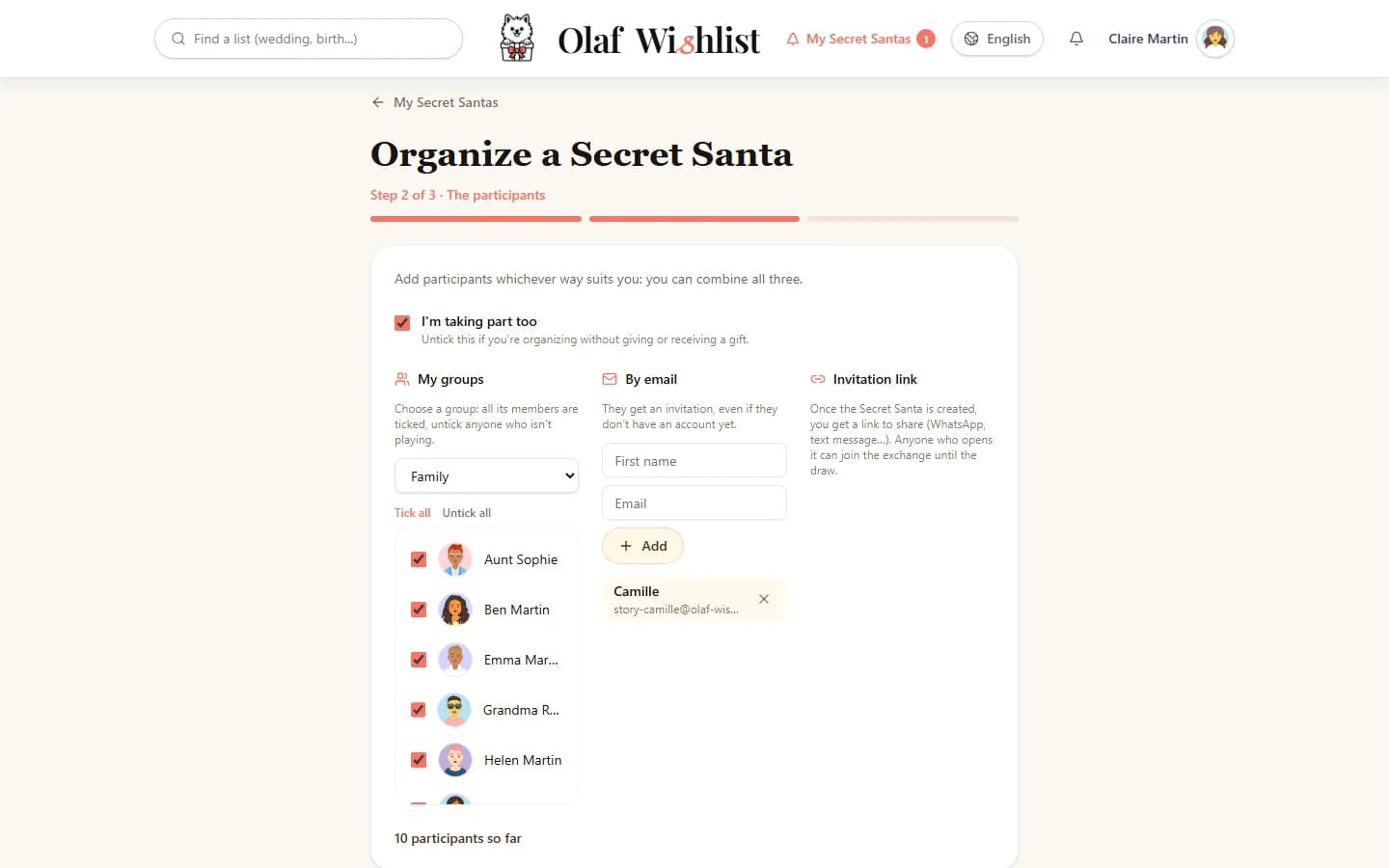
I started from the page of our « Family » group: « Organize a Secret Santa with this group ». Step one, the exchange. Olaf had already suggested a name, « Christmas » followed by the year. For exchange day I chose 25 December, with the reveal at 10 am: we open our presents first thing on Christmas morning, and I wanted everyone to keep guessing over breakfast before finding out who had spoiled whom. Budget: £30 per present.
Step two, the participants. Every member of the group was already ticked, and so was « I'm taking part too ». Camille, Ben's partner, isn't in the group, so I added her with her first name and email address. She got an invitation in her name, created her account with that same address, and found herself signed up.
Find out more: Organise a Secret Santa in 3 stepsInvite by link, QR code or email
Tom won't draw Emma
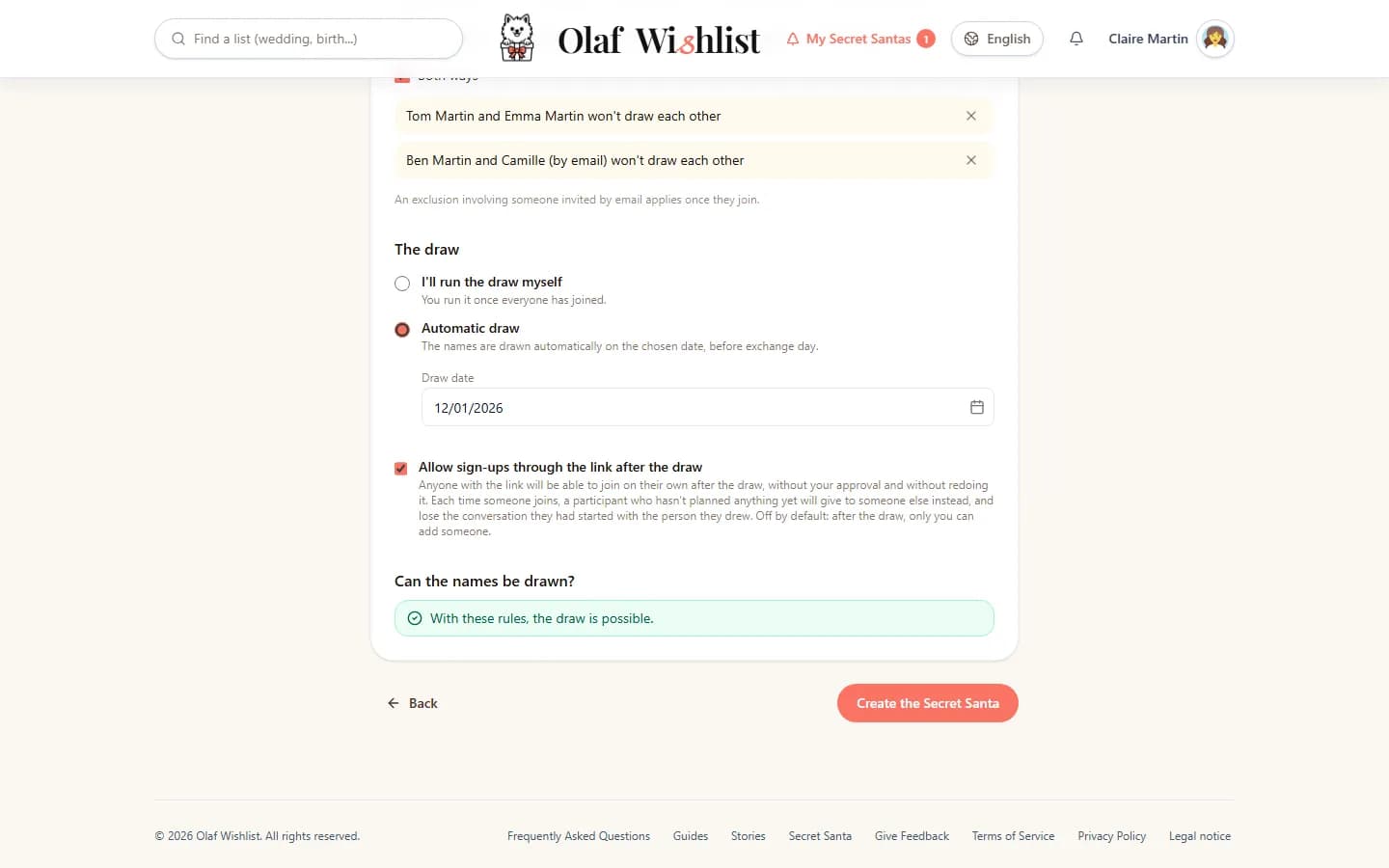
Step three, the rules. Tom and Emma give each other a present anyway, and so do Ben and Camille: if they drew each other, one of them would get two presents from the same person. So I added two exclusions, « Both ways »: Tom and Emma won't draw each other, and neither will Ben and Camille. Camille, who hadn't joined yet, already showed up under her first name. With every exclusion, Olaf checked live that the names could still be drawn. They could.
Find out more: Organise a Secret Santa in 3 steps
I organise, and I still play
I was organising, but I wanted my share of the surprise. I chose the automatic draw, on 1 December: I wouldn't even have to run it. In the advanced options, I left « I want to be able to see every draw » unticked: I don't know who gives to whom, and I find out who I drew like everyone else. The reveal stayed on « Secret until exchange day ».
Find out more: The draw
The link, for those who aren't in the group
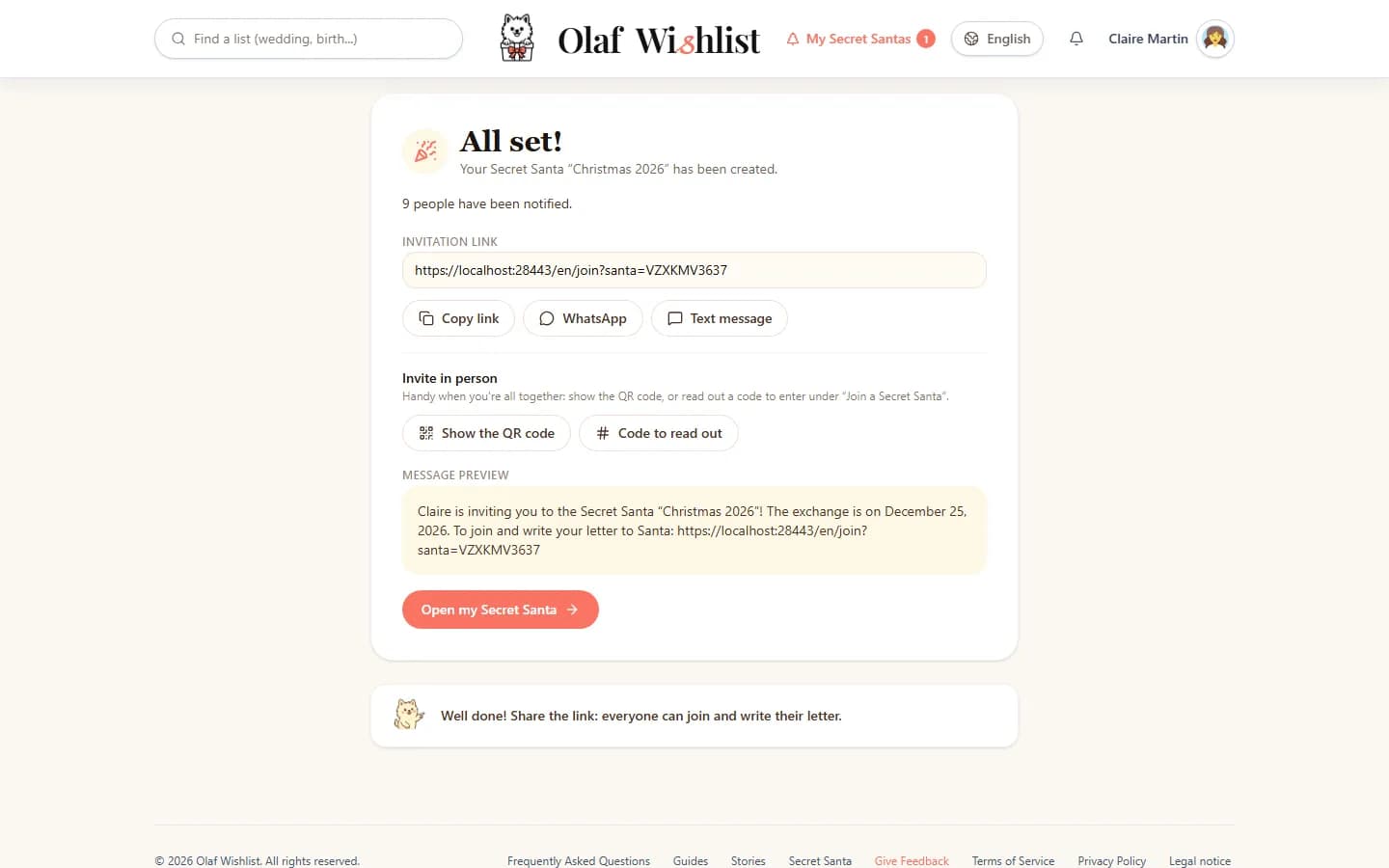
Last screen: « All set! ». The invitation link, with a message ready to go on WhatsApp, by text, or to copy into any other messaging app. The family group had already signed up, so the link was for everyone else. I posted it in the cousins' WhatsApp chat. When you're all together, the « Organization » tab also shows a QR code to scan, but the cousins are scattered all over. Lucas, Aunt Sophie's son, who lives abroad, wouldn't see the message until much later.
Find out more: Invite by link, QR code or email
My letter to Santa, within budget
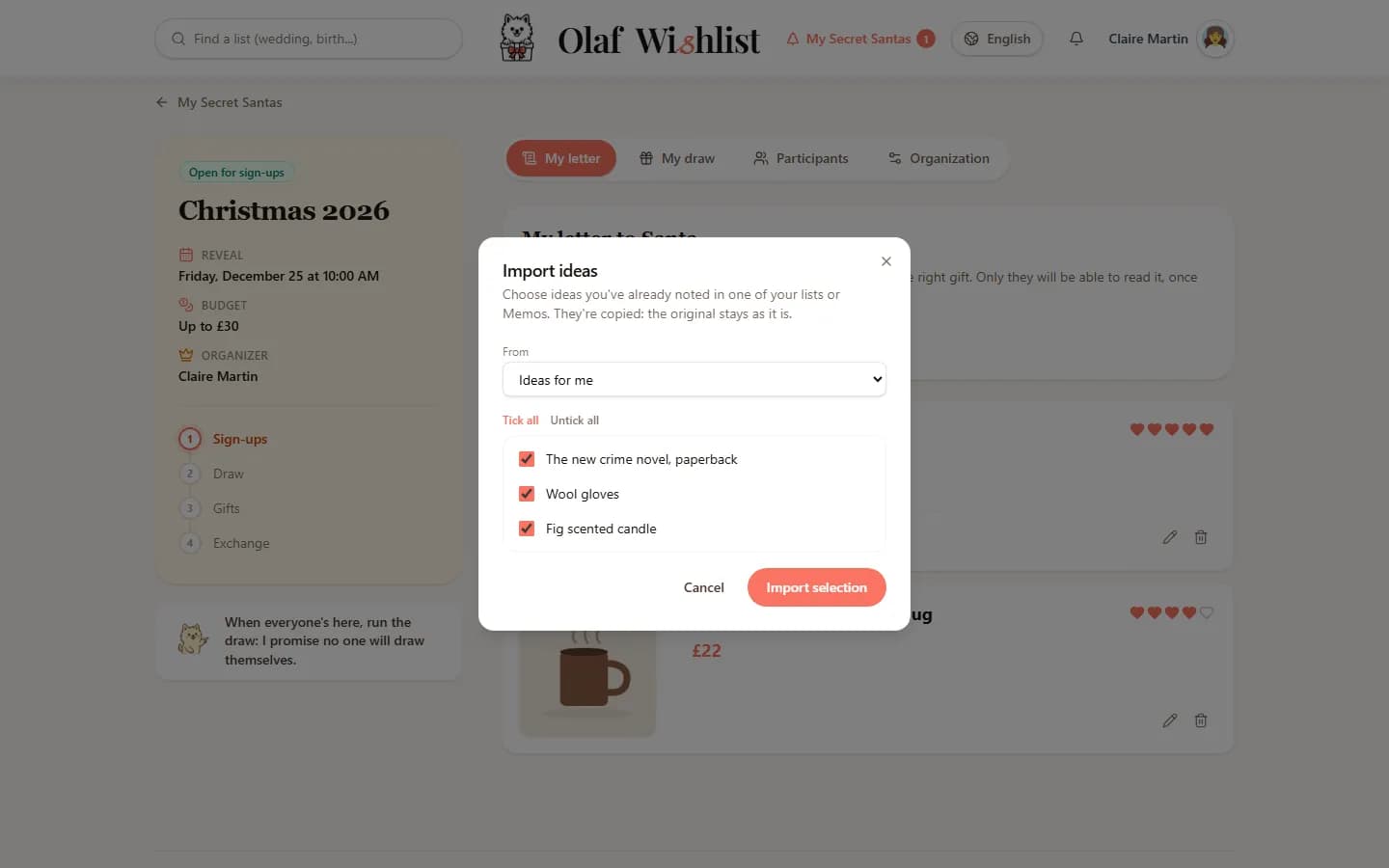
In the « My letter » tab, I started with « Import ideas »: three things I'd been noting in my Memo since the summer moved across in a few clicks. I added one from a shop's website with the extension, and another I'd spotted in a shop, from my phone. They all fit within the £30: that's the rule, and it makes things easier for whoever draws me. The others wrote theirs… almost all of them.
Find out more: Write your letter to SantaMemo listsBrowser extensionMobile app
Two empty letters, one button
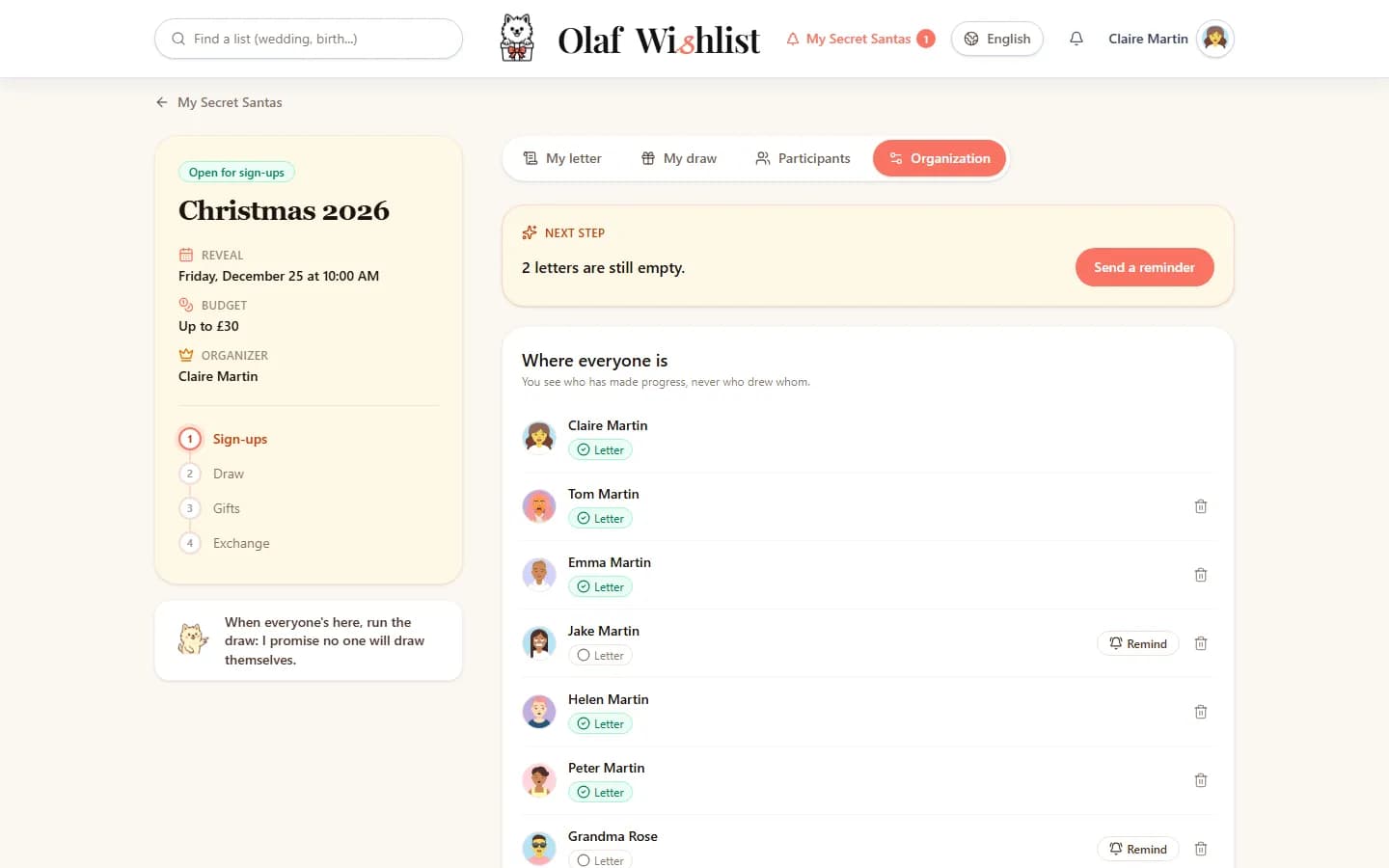
In mid-November, the « Organization » tab summed up the « Next step » in one sentence: two letters were still empty. The table showed who had written theirs, without ever showing who would draw whom: Grandma Rose and Jake hadn't written a thing. One click on « Remind those with an empty letter », and they got a reminder. Grandma Rose wrote hers that same evening, on the phone with me. Jake, three reminders later.
Find out more: Keep track and send remindersNotifications
The envelope of 1 December
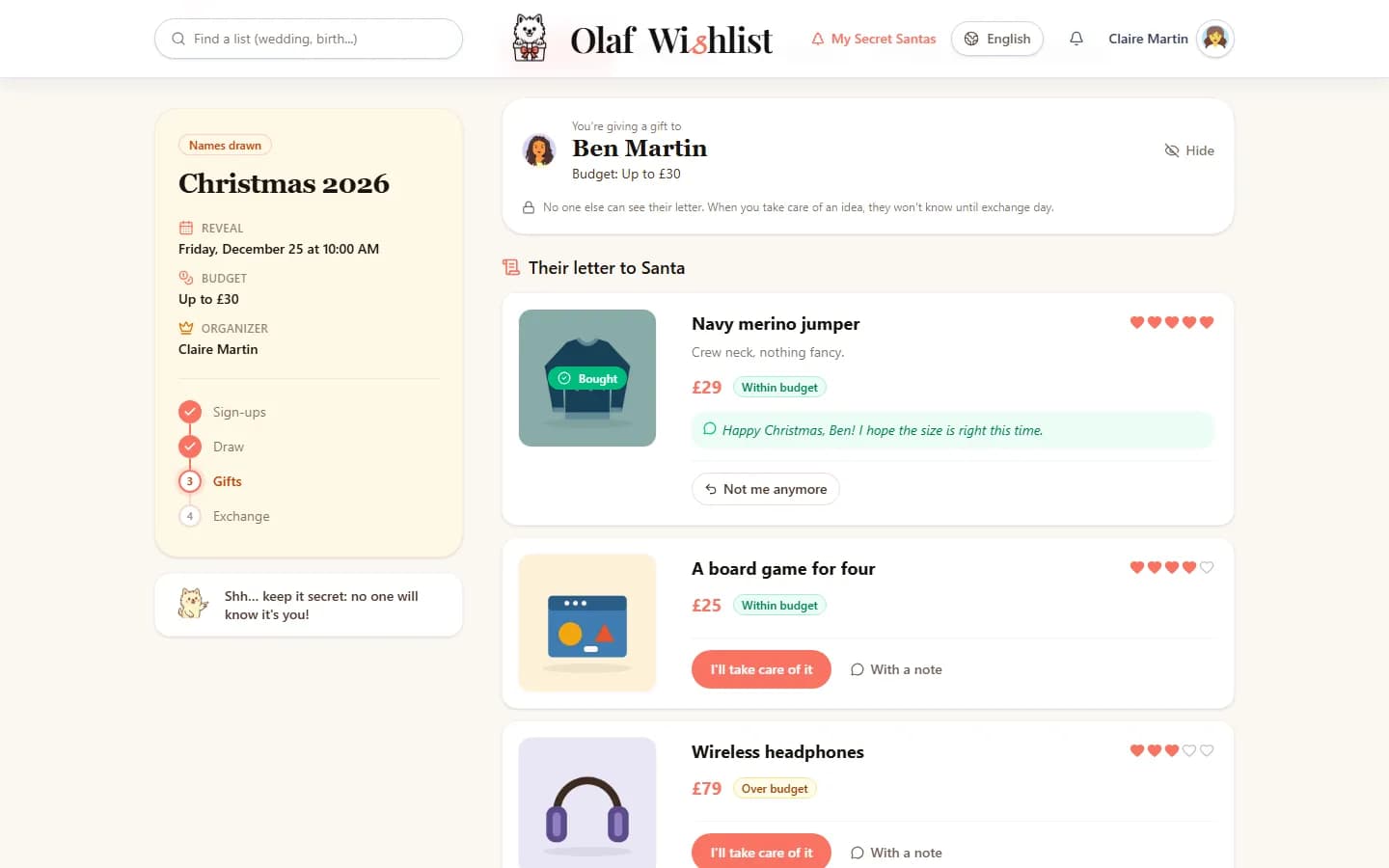
On 1 December, the names were drawn on their own. The notification gave no names: the names have been drawn, find out who you're giving a gift to. In the « My draw » tab, an envelope was waiting for me. I opened it where no one could see: Ben. Under his name, the budget, then his letter, with the ideas within budget first and an « Over budget » badge on the others.
I liked the navy jumper straight away. Rather than a plain « I'll take care of it », I chose « With a note »: Ben will read it at the reveal, along with my name. The idea switched to « Bought » at once. For anyone who still hadn't planned anything, Olaf sent a reminder a week before the exchange, then three days before.
Find out more: “My draw”: find out who you're giving to“I'll take care of it”: choose the gift in secretNotifications
What size is Ben?
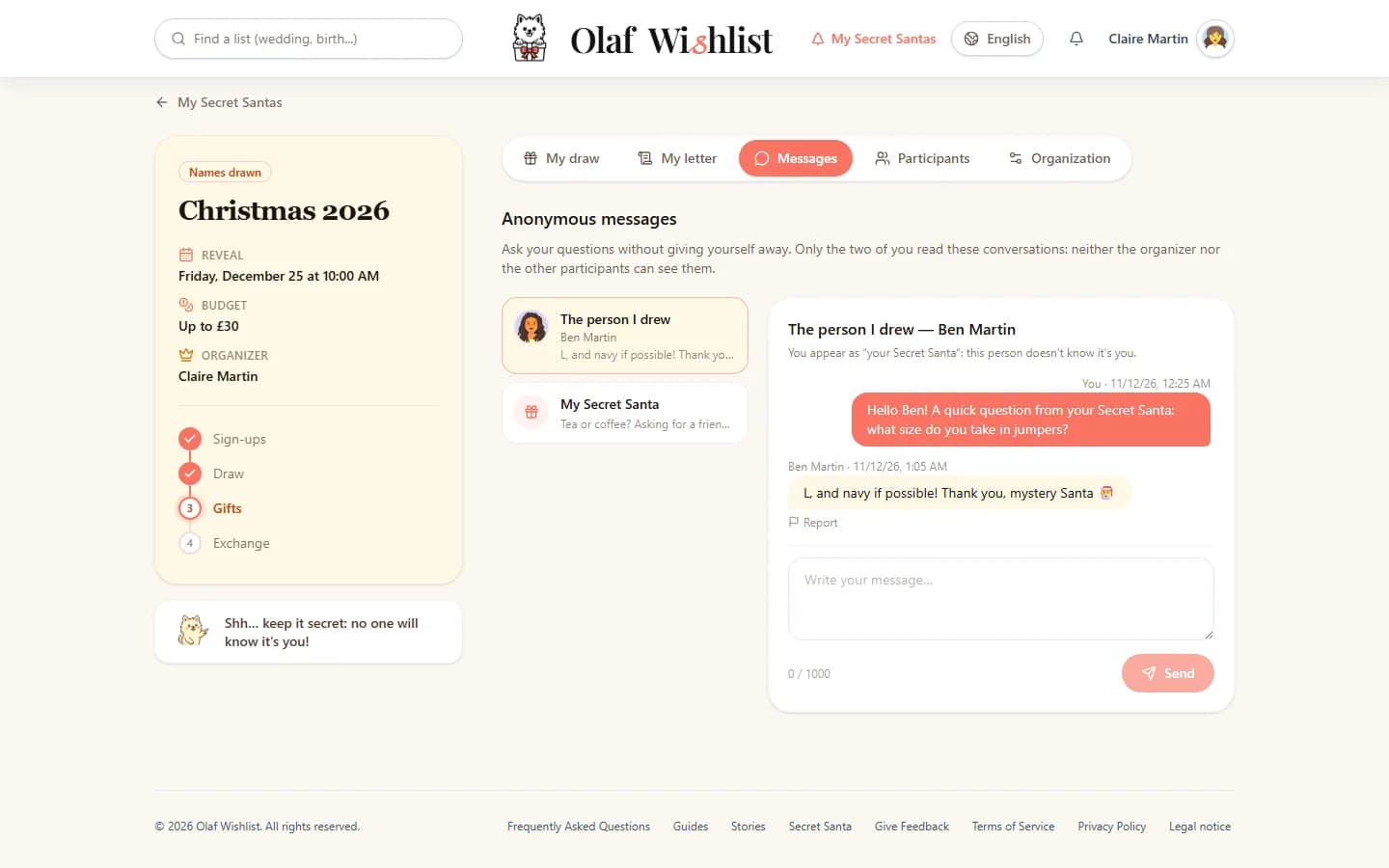
A jumper is only any good in the right size. In the « Messages » tab, the « The person I drew » conversation let me write to Ben without signing: on his side, my message comes from « Your Secret Santa ». He replied « L, and navy if possible », with no idea he was writing to his sister. In the other conversation, « My Secret Santa », someone asked me whether I preferred tea or coffee. I didn't guess a thing.
Find out more: Ask an anonymous question
Lucas turns up after the draw
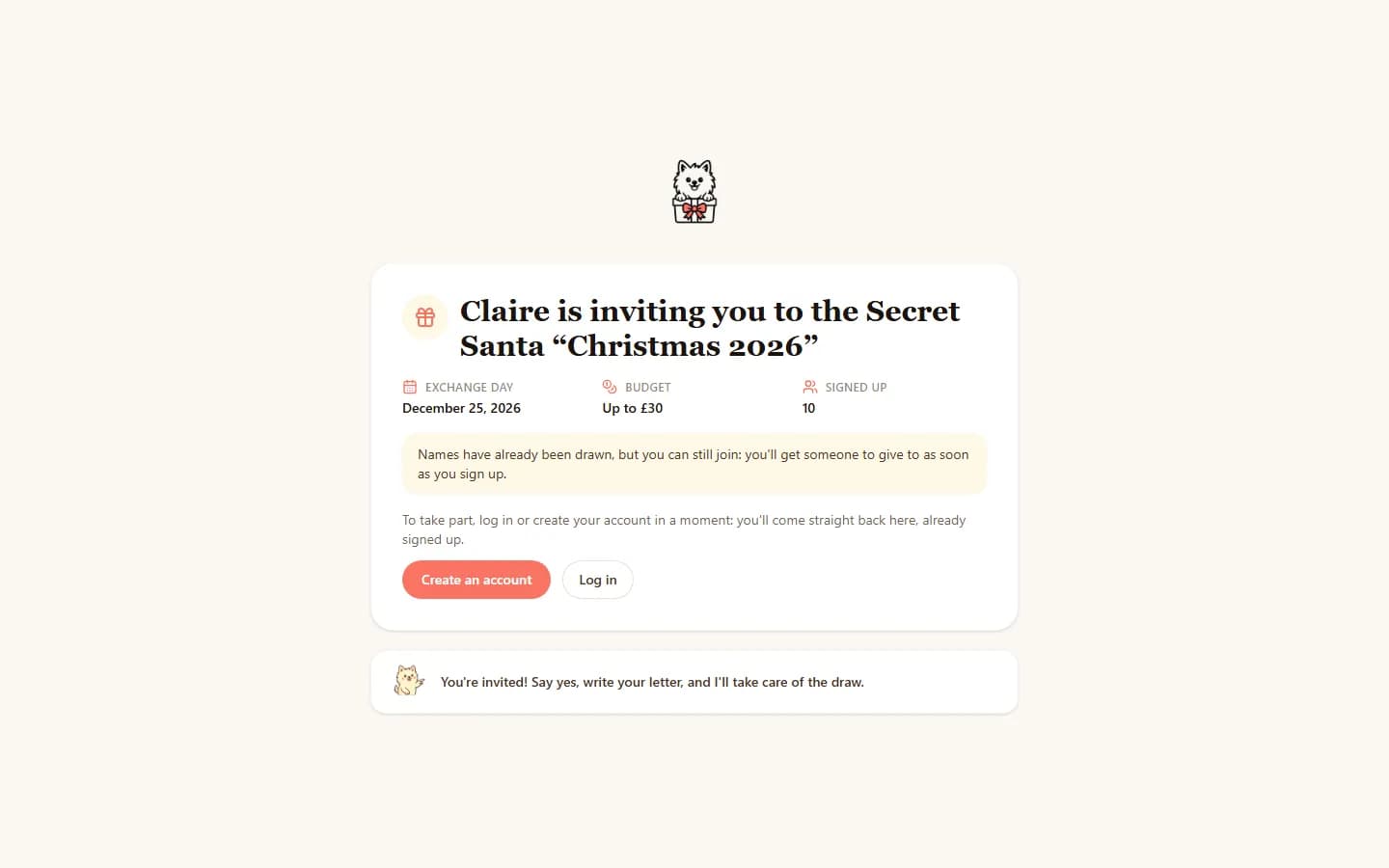
Lucas saw the message on 10 December. The names had been drawn long before, but when I set things up, I had ticked « Allow sign-ups through the link after the draw ». He opened the link and created his account in one go, with his Google account; a sign-in link received by email would have worked too. Back on the page, he was already signed up. The names weren't drawn again: just one person, who hadn't planned anything yet, saw a change in who they were giving to, and the exclusions still held. Nobody else noticed a thing.
Find out more: Join a Secret SantaThe draw
25 December at 10 am: who was whose Santa
On Christmas morning, we opened our presents trying to guess. At 10 am, the time I had chosen, the notification arrived: find out who your Secret Santa was. The « Participants » tab finally showed who gave to whom. In « My letter », I could see what I'd been given, by whom, and the note that came with it. It was Jake. I thanked him in our conversation, which stays open for another week.
Find out more: The day of the exchange and the reveal
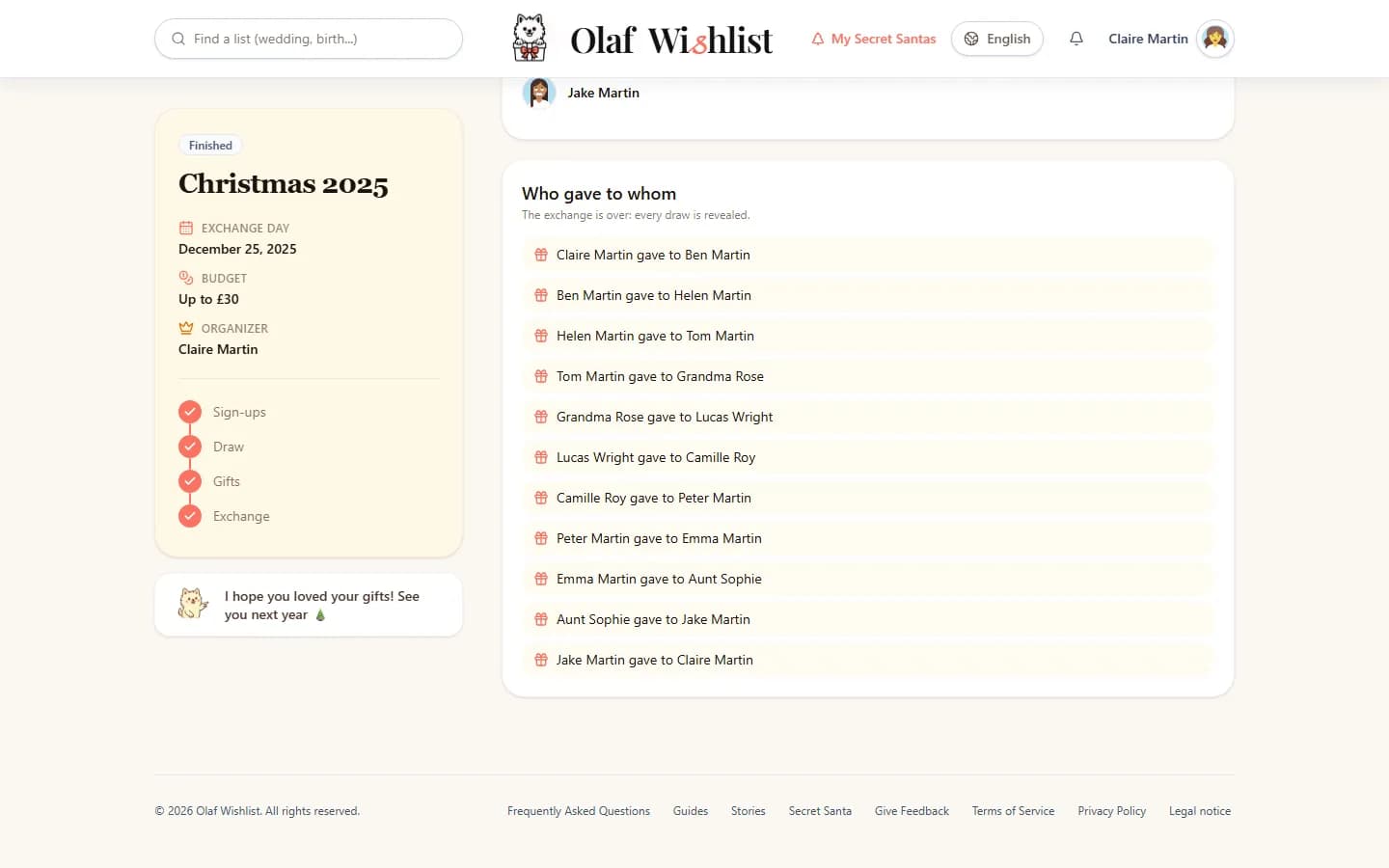
And next year, not Ben again
The next day, I chose « Do it again next year » in the « Organization » tab. Next year's exchange is already set up: the same name with the new year, the same participants, the same exclusions. Everyone will just have to confirm they're in, and at the draw, Olaf will avoid this year's pairs. So Ben will have a different Secret Santa. So will I, I hope: this year's now knows my taste in tea a little too well.
Find out more: Do it again next year
One present each instead of ten, a budget everyone stuck to, and little ones as spoilt as ever. In the end, the hardest part was getting Jake to write his letter.
Organise a Secret SantaThe screenshots on this page show the app in English. Any names, lists and amounts you can see in them are fictional.
More stories
A family Christmas, told step by step
A family, its lists and its secret reservations, told step by step with screens from the app.
Our wedding list, told step by step
A couple, their wedding list and their guests, told step by step — from keeping the surprise to following reservations, with screens from the app.
Our baby list, told step by step
A baby list run by two parents, shared in the family WhatsApp group and followed live, told step by step, with screens from the app.